The full version
Free demo





In full version as of 20 November 2026






New cities every month
There’s a lot more to explore in Takt.
The free demo gives you five cities and ten in-game years to build your transport networks. The full version unlocks every city, removes the ten-year limit and lets you keep building for as long as you like.
Every city brings its own transport challenges. New cities are added every month, and all future updates are included in the price.
€15 until 30 November 2026, then €19.
Pay once and play for as long as you like. No subscription, no account to create, and no extra charges for future updates.
You can start with the demo and buy the full version whenever you’re ready. Your existing games and progress stay exactly where they are.
Buy it
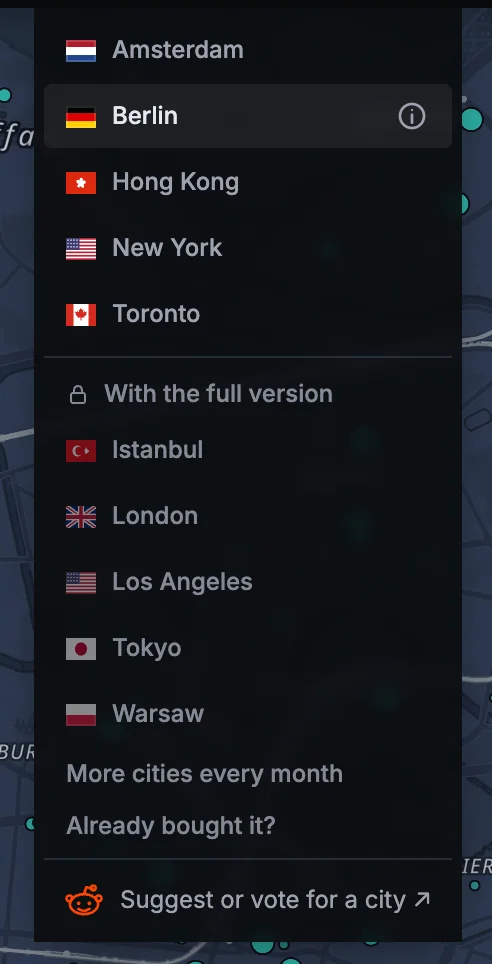
You can buy the full version on the homepage or directly in the game. The easiest way is to open the city list and click any grey city under With the full version. Its page explains what’s included and has a Buy full version of Takt button.
- Click Buy full version of Takt. Paddle’s secure payment window opens over the page.
- Pay by card or another payment method offered by Paddle. You don’t need to create a Takt account.
- Paddle sends your receipt to the email address you used for payment.
- Once your payment is confirmed, the page opens the selected city in the game, usually within a few seconds. Your saved games stay as they are.
Paddle handles the payment, invoice and tax for Takt. The payment window says Clickport because Takt uses that account with Paddle. Your purchase is still for Takt.
Sometimes confirmation takes a little longer. If you see Your payment went through. Your cities open in a few minutes, your payment is complete. You can keep playing a demo city while Takt receives the confirmation. Your full version will unlock automatically; you don’t need to stay on that page.
Play it on another computer
Your purchase isn’t tied permanently to one computer. You can move the full version to another browser whenever you like. You just need the email address you paid with and your Paddle receipt.
- In the new browser, open the city list.
- Click Already bought it? under the grey cities.
- Enter the email address you paid with and the last four characters of the Transaction ID on your Paddle receipt. The Transaction ID starts with
txn_. Enter only its last four characters. - Click Open my cities.
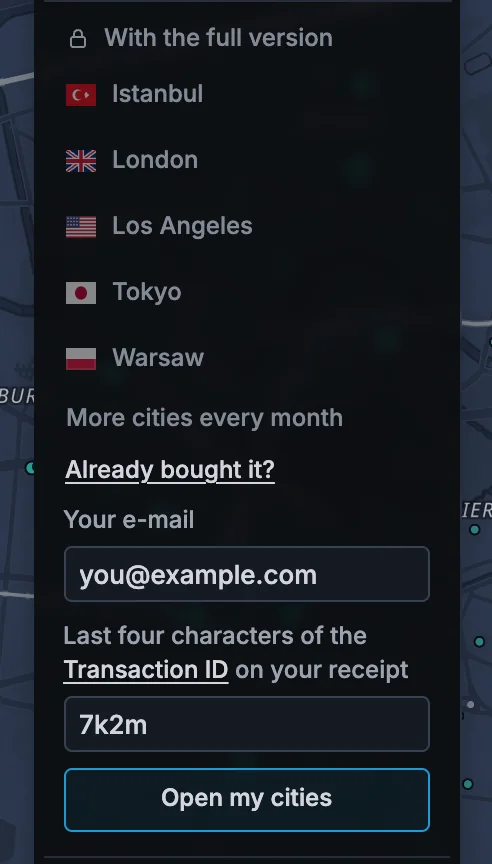
Your full version’s cities will now open in the new browser. The full version works in one browser at a time, so the old browser will switch back to the demo and show Your full version is on another browser. To move it back, follow the same steps there.
You can transfer your purchase between browsers as often as you like. After ten incorrect attempts in one day, you’ll have to wait until the next day to try again.
Bought on a phone?
Takt needs a screen at least 900 pixels wide, so it won’t run on most phones. But you can still buy the full version on your phone and unlock all the extra cities on your computer using the steps above. You don’t need to pay again.
Your games in the extra cities
Your games in the full version’s cities save in your browser just like any other game. Buying the full version doesn’t change your existing games.
Moving your purchase to another computer doesn’t move your saved games, though. To take a game with you, download its game file and open it on the other computer. See Save and share for details.
Refunds
You have 14 days to request a refund, for any reason. Just email support@playtakt.app. The refund page explains the details.
Once your refund is processed, the extra cities will lock again. Any games you saved in them will remain in your browser.