Shared and parallel track
Two lines can run on the same track. That saves building money, but the lines then share the room on the track. When the track is full, a second track beside it gives a line room of its own.
Shared or parallel?
| Shared track | Parallel track | |
|---|---|---|
| What it is | Your line runs on the track of another line. | Your line gets a new track beside the track of another line. |
| Cost to build | Nothing for the shared section. Only a curve that joins the track can cost money. | Like any new track. |
| Room on the track | The lines share it. | Each track has its own. |
| Use it when | You want a branch or a second service cheaply. | The shared track is full. |
Metro and railway lines choose to share track. Buses and trams on the same street share it by themselves.
How much a track can take
Each section of track has a limit of vehicles an hour in each direction. The departures of every line on the section count together.
| Kind of line | Vehicles an hour in each direction | That is one vehicle every |
|---|---|---|
| Bus, on the same street | 90 | 40 seconds |
| Tram, on the same street | 40 | 1.5 minutes |
| Metro | 30 | 2 minutes |
| Railway | 20 | 3 minutes |
An example: one metro line runs every 4 minutes, which is 15 trains an hour. A second metro line on the same track then has room for 15 more, so it can also run every 4 minutes. Every 3 minutes would need 20, and the game refuses it.
A hidden line counts too, and so does a line that is still a plan. A parked line does not. Track capacity on the map shows how full each section is.
Run a line on another line's track
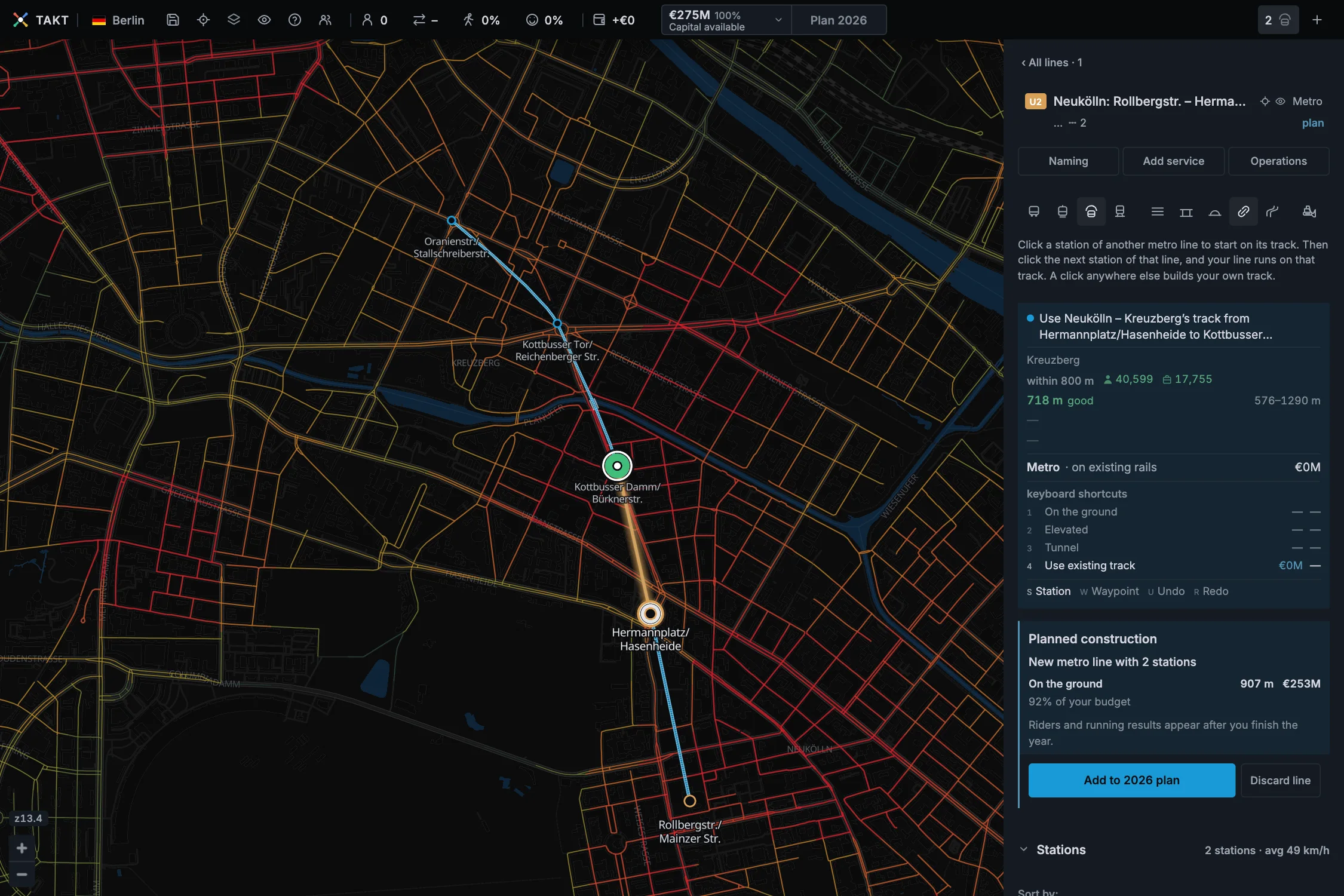
This works for metro and railway lines of the same kind.
- Draw your line to a station of the other line. Use existing track switches on by itself.
- Click the other line's next station. The card says "Use … track from" one station "to" the next.
- Keep clicking stations along the other line for as long as you want to share it.
- To build your own track again, click anywhere else. Press 1, 2 or 3 for its level.
Planned construction then says "Partly on existing track". The shared sections cost nothing.
If your line arrives at an angle, the game bends the last part of your track so that it meets the other track smoothly. The card then says "the approach bends into its track" and gives the price of the bend. A line that arrives in the direction of the track, as in the picture, needs no bend.
If your line already ends at the other line's station, click that end station, then press 4 or click Use existing track.
The other line must be visible. A line hidden with its eye cannot be used; the card then says "Use existing track · no visible rails".
A click close to a station you could share is refused: "Click … to use its track, or click further away to build new track."
When a connection does not fit
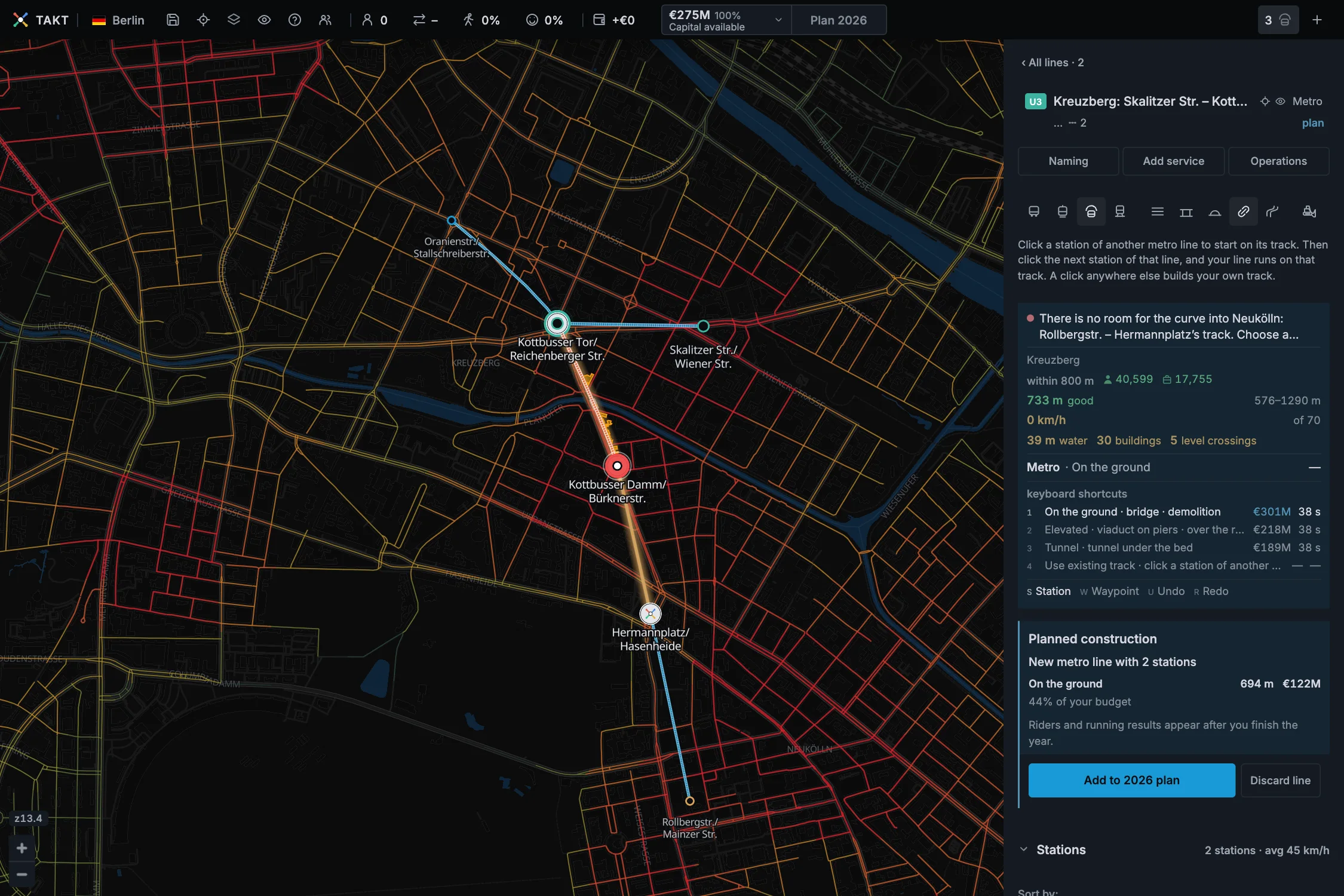
A train cannot turn sharply. Where your track meets the other track, the game must fit a curve. When it cannot, the card says why:
| The card says | Do this |
|---|---|
| … would have to turn back on itself … | Go on in the other direction, or leave on your own track. |
| … built track meets … track too sharply here … | Built track does not move. Choose a station farther along. |
| There is no room for the curve into … track. | Choose a station farther along, move the station before the join farther away, or arrive at a flatter angle. |
| A tunnel cannot join elevated track. | Put a section on the ground between them. |
| This turn is too tight for metro. | Choose a different station or route. |
In the picture, the third line comes from the east and wants to turn south onto the shared track. That turn would be too sharp. The second line fits, because it arrives from the south and runs on in the same direction.
When shared track is full
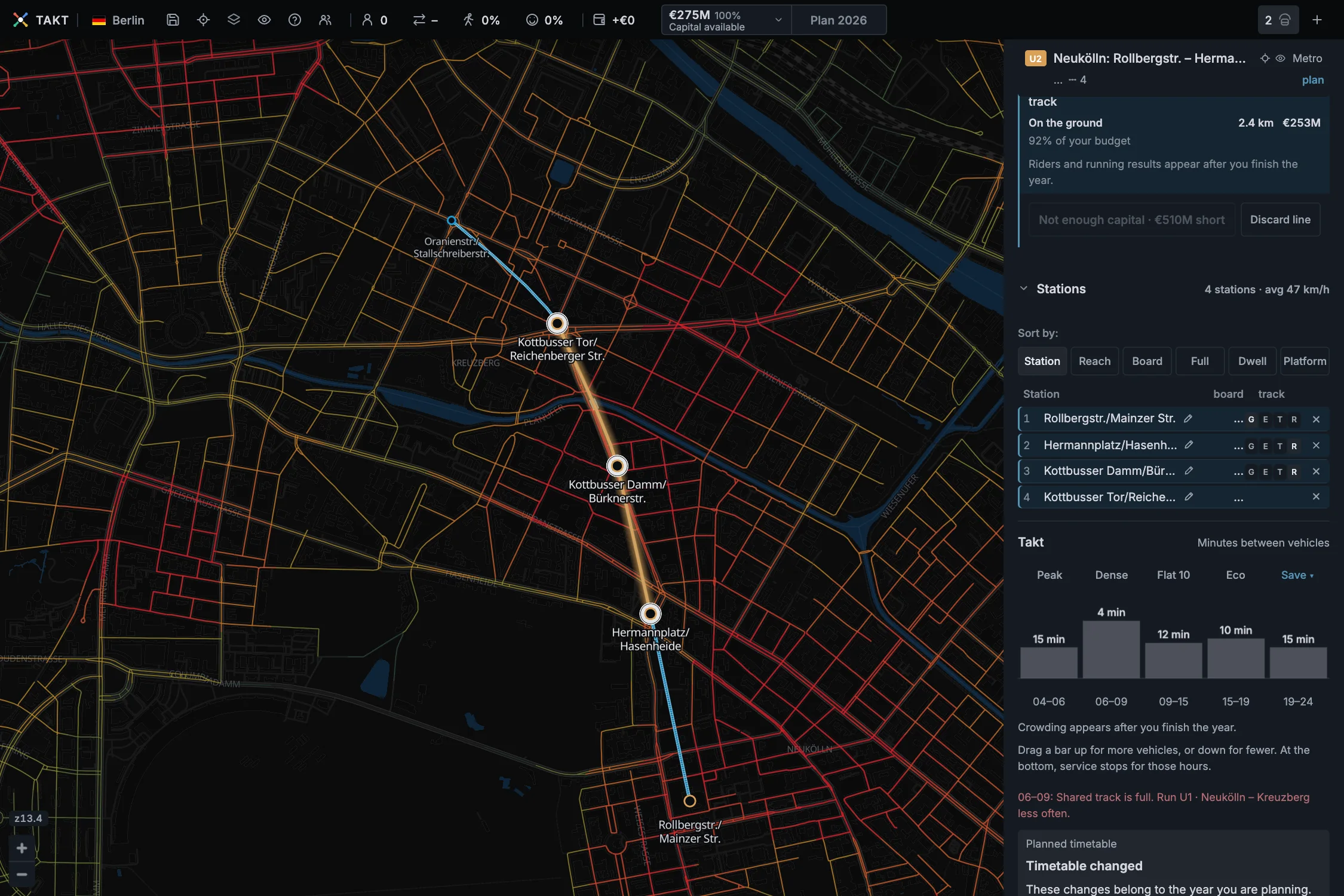
When you drag a takt bar up, the game counts every line on the shared track. The bar stops at the last step that fits, and a red line names the line that uses the room: "Shared track is full. Run … less often."
You can then do one of these things:
| Choice | What it does |
|---|---|
| Run the other line less often | Its room goes to your line. Check that the other line does not become too full. |
| Use longer trains | More people fit in each train without more trains. Lengthen the platforms. |
| Build parallel track | Your line gets its own track, with its own room. |
A second service on the same metro or railway track cannot skip stations, because it could not pass the train in front. Two services on one route explains this.
Build parallel track
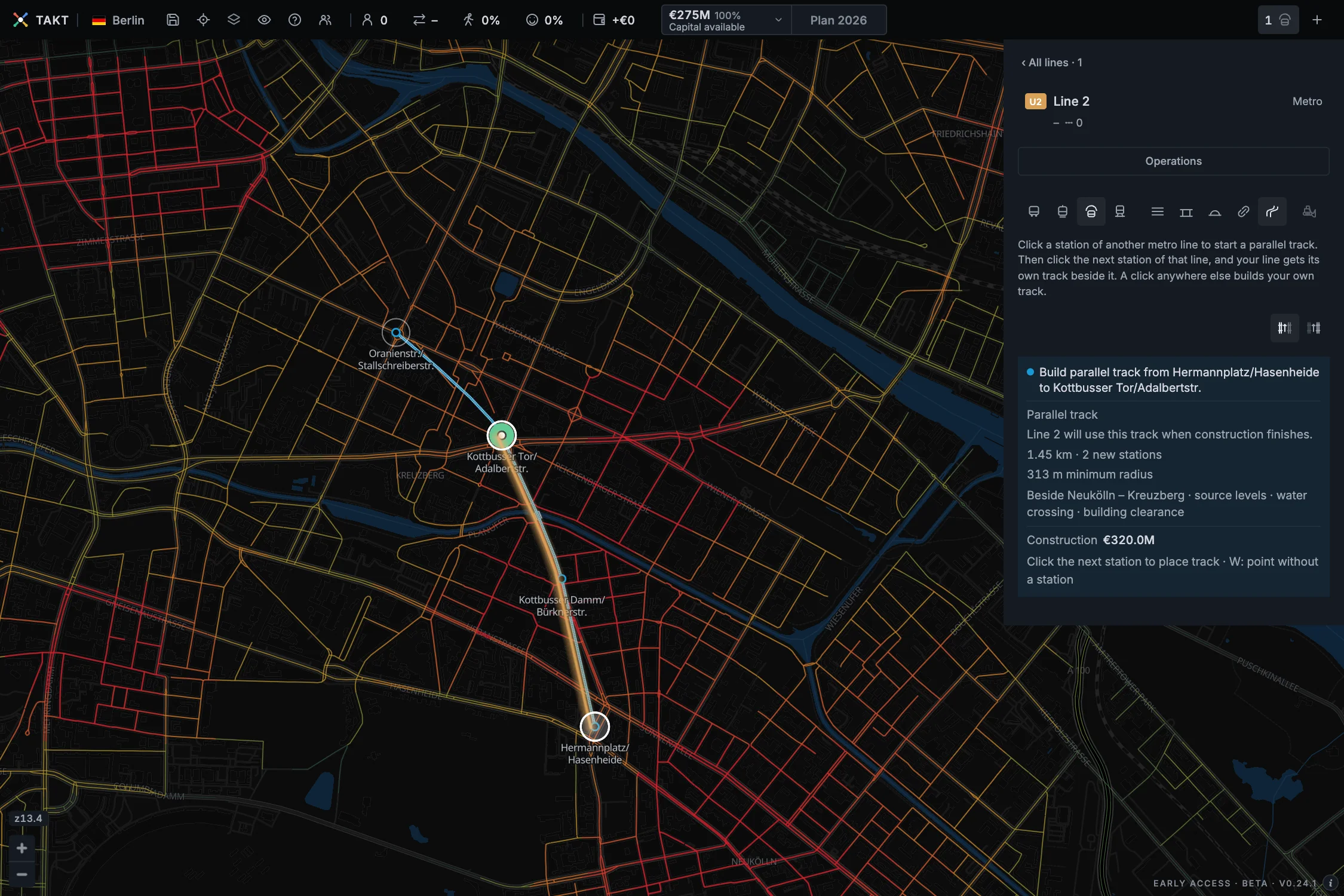
- Open the metro or railway line that will use the new track.
- Click the parallel track button beside Use existing track, then choose the left or right side.
- Click a station of the other line. The card says "Start parallel track at" that station.
- Click the next station you want to serve. The card says "Build parallel track from" one station "to" the other.
- Keep clicking stations for as long as you want the new track.
The new track runs 20 metres beside the other one, at the same levels. Stations you pass without clicking do not become stops. Press W to place a point without a station.
You can switch a placed stretch to the other side until you add it to the year's plan. The other line keeps its own track.
The game refuses parallel track beside your own line, beside a line that is not visible or not of the same kind, and beside track that is still being built. A plan with a gap must be rebuilt first: "The source track has a gap. Rebuild it first."
Join another track without a station
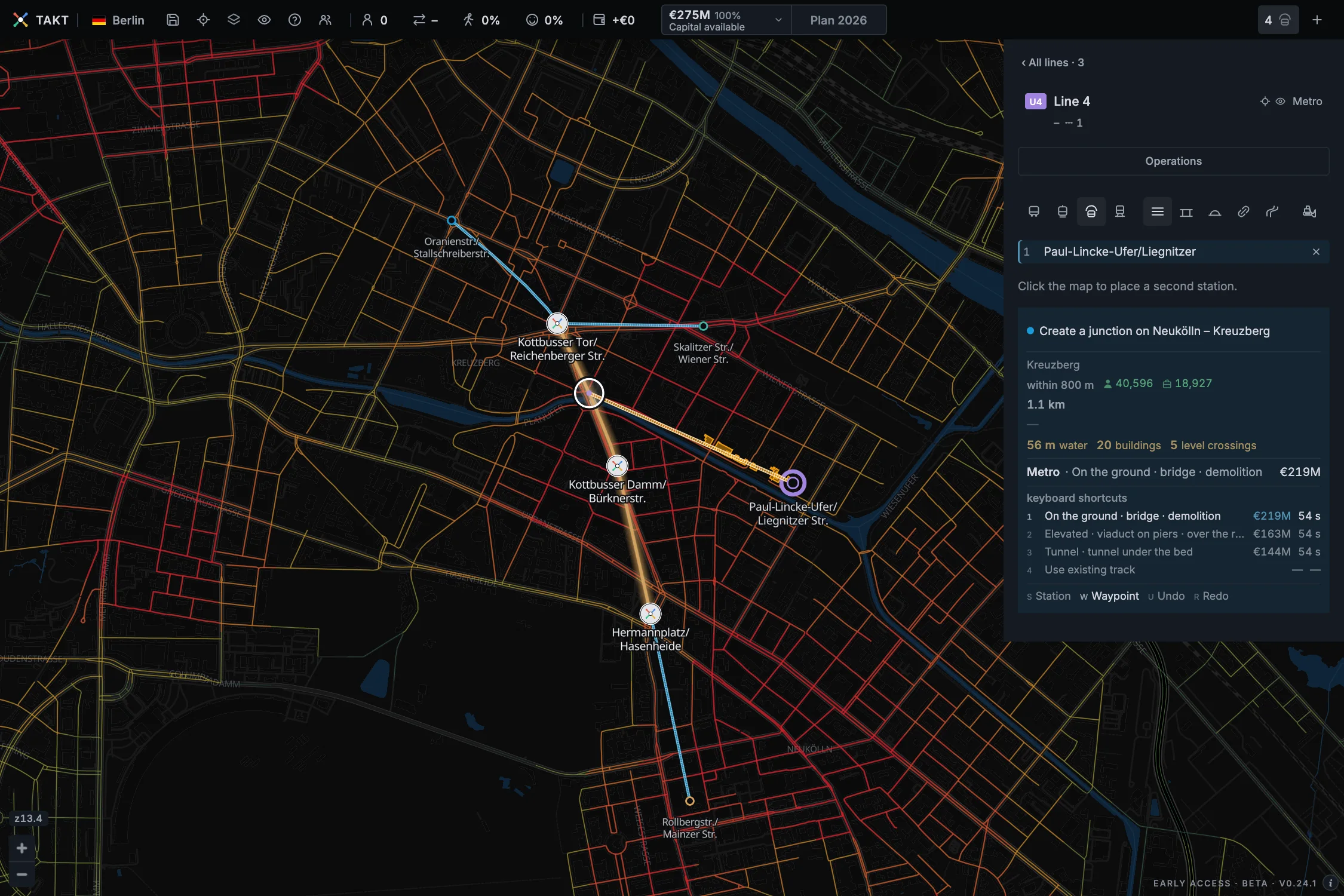
Your line can meet another track between two stations. Press W, then point at the other line's track. The card says "Create a junction on" that line. Click to join the track there.
A line that already runs on the other track can leave it at a junction: "Use … track to this junction · no new track". A new line can also start at one: "Start at a junction on" the line.
A junction has no platform and no passengers. Press S to place stations again.
Stations on shared track
A new station on shared track serves every line on it. The card says which other lines "stop here too".
A line that runs on another line's track can stop at that line's stations: "Stop at … on the shared rails". Between two stations it cannot place a station of its own; the card says "This section runs on another line's rails. Click one of its stations to stop there."
Taking out a shared station closes it for all lines. The Bulldozer asks for a second click first. Lines at a shared station share its platform, and a longer platform is paid once.
Change a shared section later
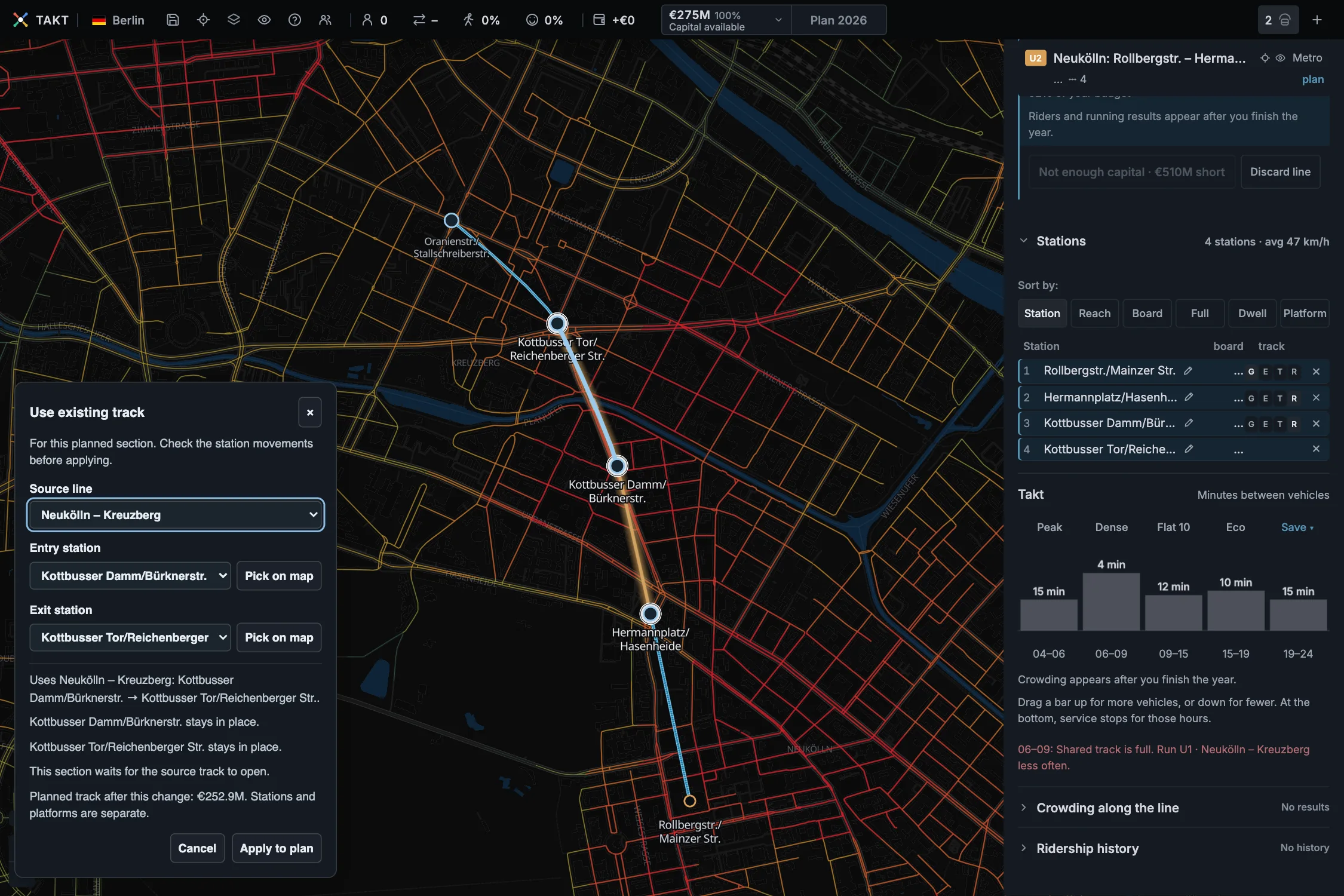
In the Stations list, click R beside a planned section. Choose the Source line, the Entry station and the Exit station, from the lists or with Pick on map.
The panel lists which stations stay in place or move, and the planned track cost after the change. Click Apply to plan, or Cancel. One Undo takes the whole change back.
If the other line is still a plan, your shared section waits until it is built: "This section waits for the source track to open."
To give a planned shared section its own track again, click G, E or T beside it: ground, elevated or tunnel.
Plans that depend on each other
When your line runs on another line's planned track, both plans go into the year together. The Add button says so: "… joins the 2026 plan too: … runs on their planned rails." Remove from 2026 plan takes the lines that depend on it out as well.
When a line is deleted or discarded
Rails go with their line, but track that another line uses always stays. It becomes the other line's own track. If two other lines use it, the older line gets it.
Discard plans and Delete line say this before you click, for example "… keeps the planned rails it runs on."
What the track cost stays spent. Park, discard or delete a line explains the choices.